Intent Detection Actions
Detected intent ke basis par bots trigger karein, teams assign karein, ya AI agents switch karein
Updated 10 February 2026
Jab AI customer ka intent detect karta hai, to wo teen actions mein se ek le sakta hai: Bot Flow trigger karna, conversation ko team ko assign karna, ya alag AI agent ko hand off karna. Aap action ko Intent Detection Campaign create karte waqt configure karte hain.
Bot Flow Trigger
"Bot Flow Trigger" enable karein Action Settings mein jab intent create kar rahe hon. Ye ek specific Bot Flow run karta hai jab intent detect hota hai.
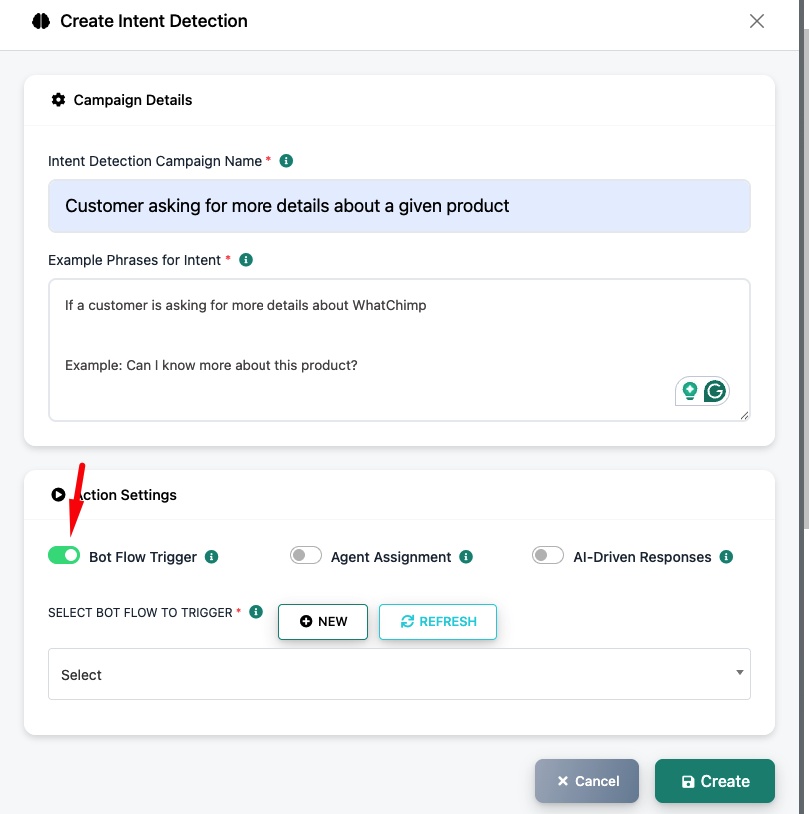
Select Bot Flow to Trigger — Dropdown se ek existing Bot Flow choose karein, ya New par click karke ek banayein. Udaharan ke liye, agar customer product kharidne ke baare mein puchta hai, to aap ek "Buy Products" flow trigger kar sakte hain jo aapki catalog dikhata hai.
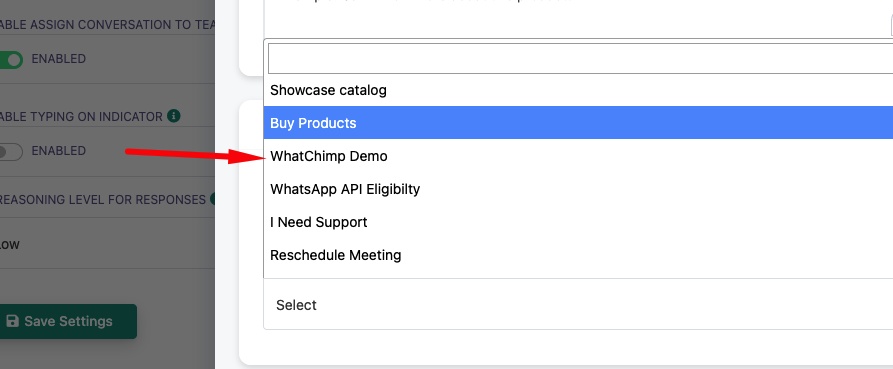
Use case: Ek customer kehta hai "Main kuch kharidna chahta hoon" → AI purchase intent detect karta hai → "Buy Products" Bot Flow trigger karta hai jo product catalog buttons ke saath dikhata hai.
Team ya Department Ko Assign Karna
"Agent Assignment" enable karein Action Settings mein. Ye conversation ko ek specific team ko route karta hai jab intent detect hota hai.
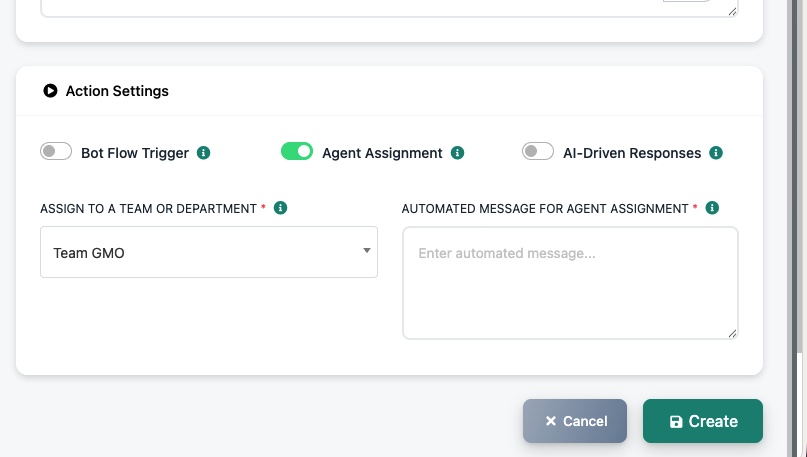
Assign to a Team or Department — Select karein ki kaun si team ko ye conversation receive karna chahiye (jaise, "Team GMO").
Automated Message for Agent Assignment — Ek message set karein jo customer ko bheja jata hai jab conversation assign hota hai (jaise, "Aapko hamare sales team se jod rahe hain...").
Use case: Ek customer kehta hai "Mujhe apne order ke saath support chahiye" → AI support intent detect karta hai → Support team ko assign karta hai → "Aapko hamare support team se jod rahe hain..." bhejta hai
Dusre AI Agent Ko Assign Karna
"AI-Driven Responses" enable karein Action Settings mein. Ye conversation ko alag data par trained alag AI agent ko hand off karta hai.
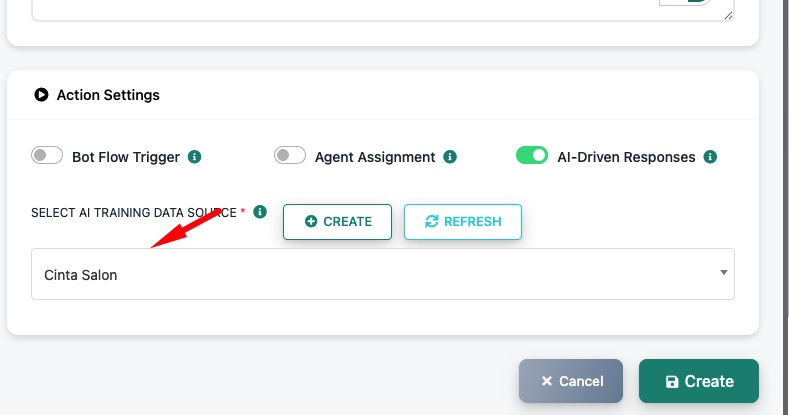
Select AI Training Data Source — Ek alag AI training campaign choose karein. Udaharan ke liye, agar aapka main AI general company info par trained hai lekin customer salon services ke baare mein puchta hai, to aap "Cinta Salon" campaign ko route kar sakte hain jo specifically salon data par trained hai.
Use case: Aap multiple businesses ya services chalate hain. Ek customer salon bookings ke baare mein puchta hai → AI salon intent detect karta hai → "Cinta Salon" AI agent ko hand off karta hai jo salon-specific FAQ aur services par trained hai.
Related Articles
Intent Detection Set Up Karein — Intents banayein aur detection configure karein
Apne WhatsApp Number ke Liye AI Agent Enable Karein — AI Agent set up aur configure karein
Apne AI Chatbot Ko Kaise Train Karein — Alag purposes ke liye multiple AI training campaigns banayein