Restrict AI on Specific Keywords
Block AI from responding to specific topics like pricing or discounts
Updated 10 February 2026
You can block the AI Agent from responding to specific topics like pricing, discounts, or anything else you want handled by a human instead. When a customer asks about a restricted topic, the AI sends a predefined response instead of generating an answer.
How to Restrict AI on Keywords
Go to Bot Manager → AI Agent → Change Settings for your WhatsApp number.
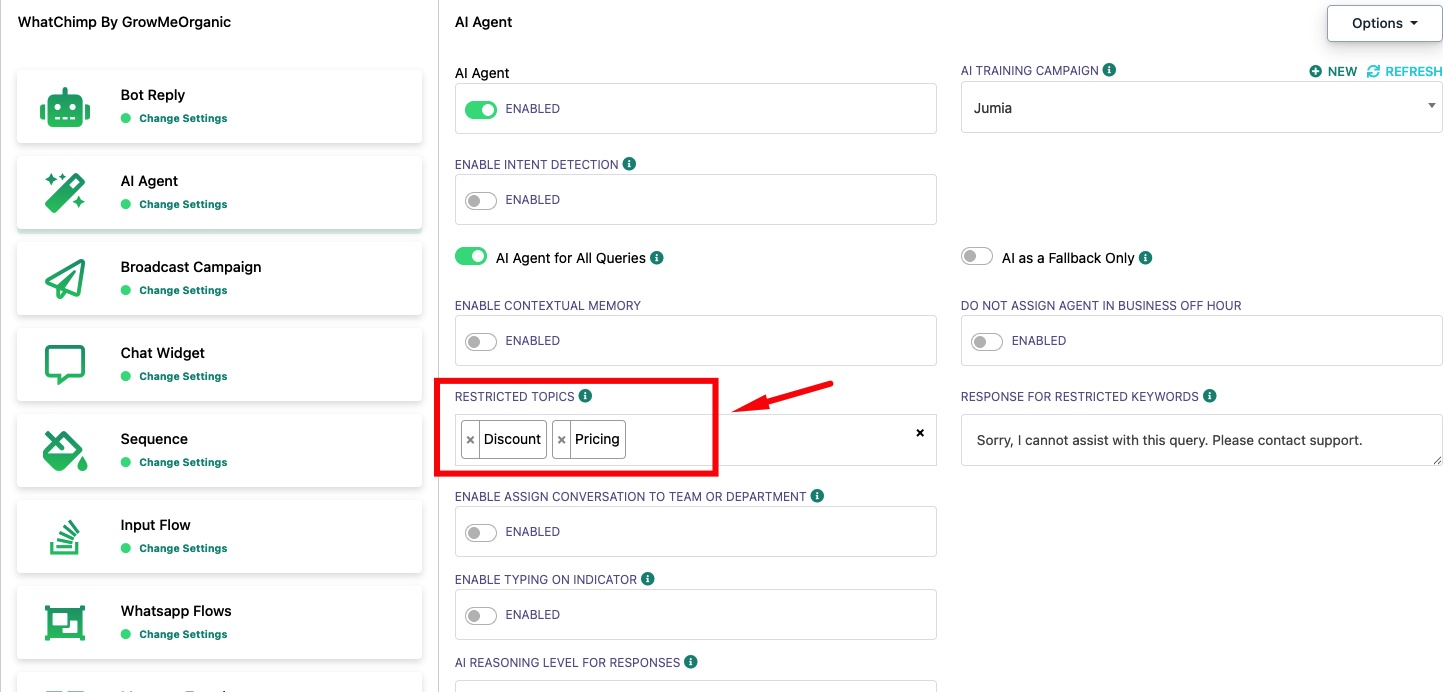
Restricted Topics — Type a keyword and press Enter to add it. Add as many as you need. When a customer's message matches any of these topics, the AI will not generate a response from its training data.
Response for Restricted Keywords — Set the message customers receive when they ask about a restricted topic. For example: "Sorry, I cannot assist with this query. Please contact support."
Example: If you add "Discount" and "Pricing" as restricted topics, any customer asking "What discounts do you offer?" or "How much does it cost?" will get your custom response instead of an AI-generated answer. This ensures sensitive topics like pricing are handled by your sales team.
Related Articles
Enable AI Agent for Your WhatsApp Number — Set up and configure the AI Agent
Set Up Intent Detection — Route specific intents to different actions