Auto-Assign Conversations to a Department
Route AI conversations to specific teams or departments automatically
Updated 10 February 2026
The AI Agent can automatically assign incoming conversations to a specific team or department. This ensures every customer message goes to the right group — like sales, support, or operations — without manual routing.
How to Enable Auto-Assignment
Go to Bot Manager → AI Agent → Change Settings for your WhatsApp number.
Toggle "Enable Assign Conversation to Team or Department" to Enabled.
Select a team from the "Assign to a Team or Department" dropdown. You'll see all teams/departments configured in your account — for example, Admin, Customer Success, Demo, Team GMO, Team Training.
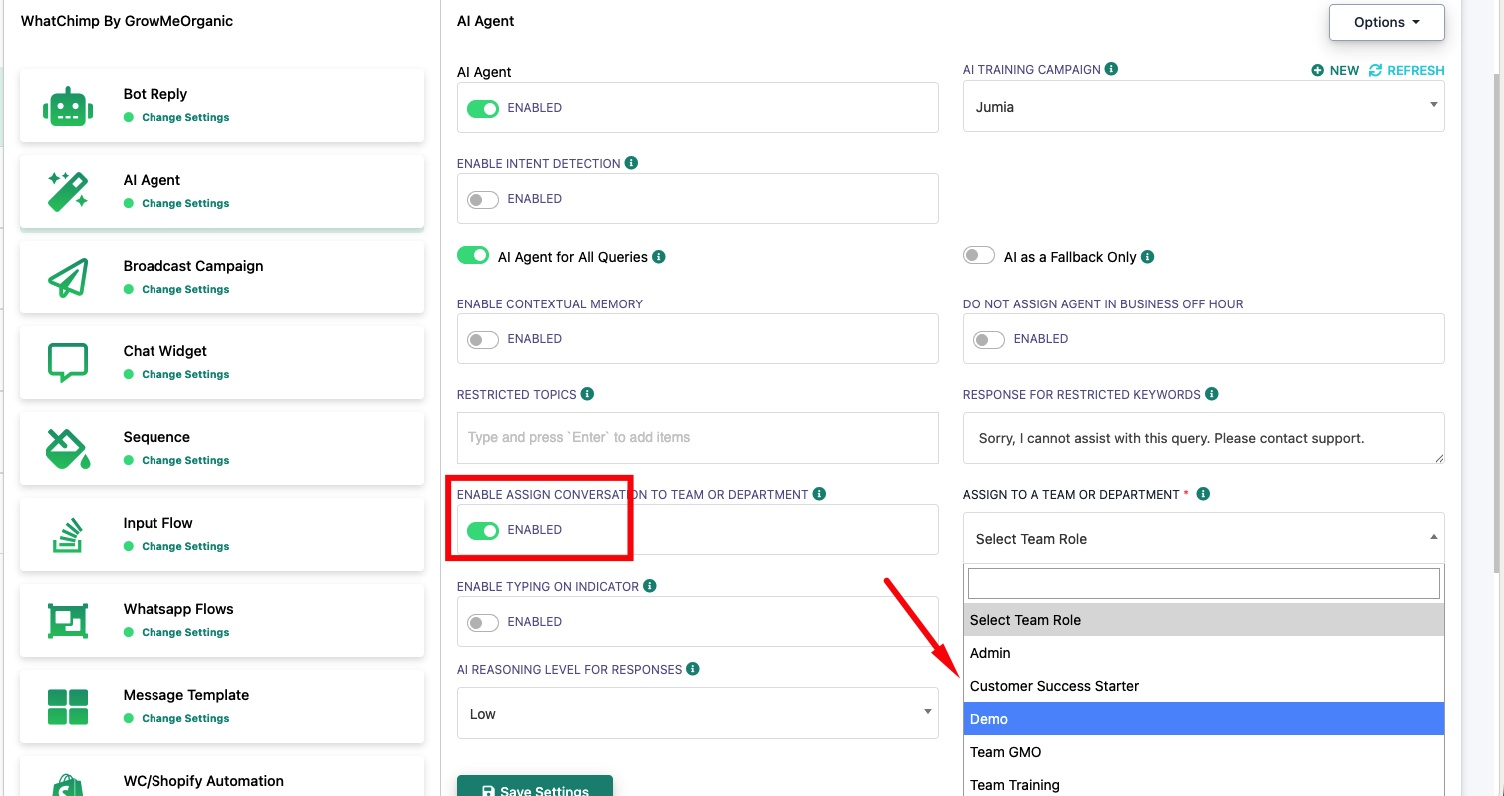
Once enabled, every conversation handled by the AI Agent will automatically be assigned to the selected team. Team members in that department will see the conversation in their Omnichannel Inbox.
Tip: Create teams in your account settings before enabling this feature. You can also combine this with Intent Detection to route different intents to different departments — see Intent Detection Actions.
Related Articles
Enable AI Agent for Your WhatsApp Number — Set up and configure the AI Agent
Intent Detection Actions — Assign specific intents to teams, bots, or other AI agents