Variáveis de modelo vs Variáveis personalizadas - Qual é a diferença?
Updated 10 February 2026
Esta é uma das fontes mais comuns de confusão para os usuários do WhatChimp: quando você deve usar Variáveis de modelo versus Variáveis personalizadas (Campos personalizados)? Ambos permitem que você personalize mensagens do WhatsApp, mas funcionam de maneiras fundamentalmente diferentes.
Compreender a diferença é crítico, especialmente se você estiver usando a API do WhatChimp. Usar o tipo errado pode fazer com que suas mensagens falhem ou exibam dados incorretos.
Comparação rápida
| Recurso | Variáveis de modelo | Variáveis personalizadas (Campos personalizados) |
|---|---|---|
| Onde criadas | Bot Manager > Message Template > seção Template Variables | Subscriber Manager > Manage Custom Fields |
| Armazenamento de dados | Temporário — passado cada vez que você envia | Permanente — armazenado no perfil do assinante |
| Anexado a | A mensagem (não o contato) | O contato/assinante |
| Melhor para | Dados dinâmicos que mudam toda vez: OTPs, números de pedido, datas de entrega, links de reunião | Dados persistentes que raramente mudam: nome, empresa, email, país, setor |
| Sintaxe do modelo | {{1}}, {{2}}, {{3}} | {{custom_field_name}} |
| Comportamento da API | Você DEVE passar valores na chamada da API (variable1=VALUE) | O sistema extrai automaticamente dos dados do assinante — NÃO precisa passar na chamada da API |
| Exemplos de casos de uso | Senha de uso único: 123456<br>ID do pedido: ORD-9842<br>Data de entrega: 15 de fev | Nome do cliente: John Smith<br>Empresa: Acme Corp<br>País: Estados Unidos |
Variáveis de modelo
As Variáveis de modelo são marcadores temporários que mudam com cada mensagem que você envia. Elas NÃO são armazenadas em lugar nenhum — você fornece o valor toda vez.
Quando usar Variáveis de modelo
Use Variáveis de modelo para informações que são:
- Únicas para cada mensagem (mudam toda vez)
- Sensíveis ao tempo ou de uso único
- Não vale a pena armazenar permanentemente
Exemplos:
- Códigos OTP (expiram em minutos)
- Números de confirmação de pedido
- Horários de compromisso ou links de reunião
- Números de rastreamento
- Valores de fatura
- Tokens de redefinição de senha
Onde criar Variáveis de modelo
Passo A. Vá para Bot Manager > Message Template e selecione seu bot.
Passo B. Role para baixo até a seção "Template Variables" (abaixo do corpo do seu modelo).
Passo C. Defina suas variáveis aqui (por exemplo, variable1, variable2).
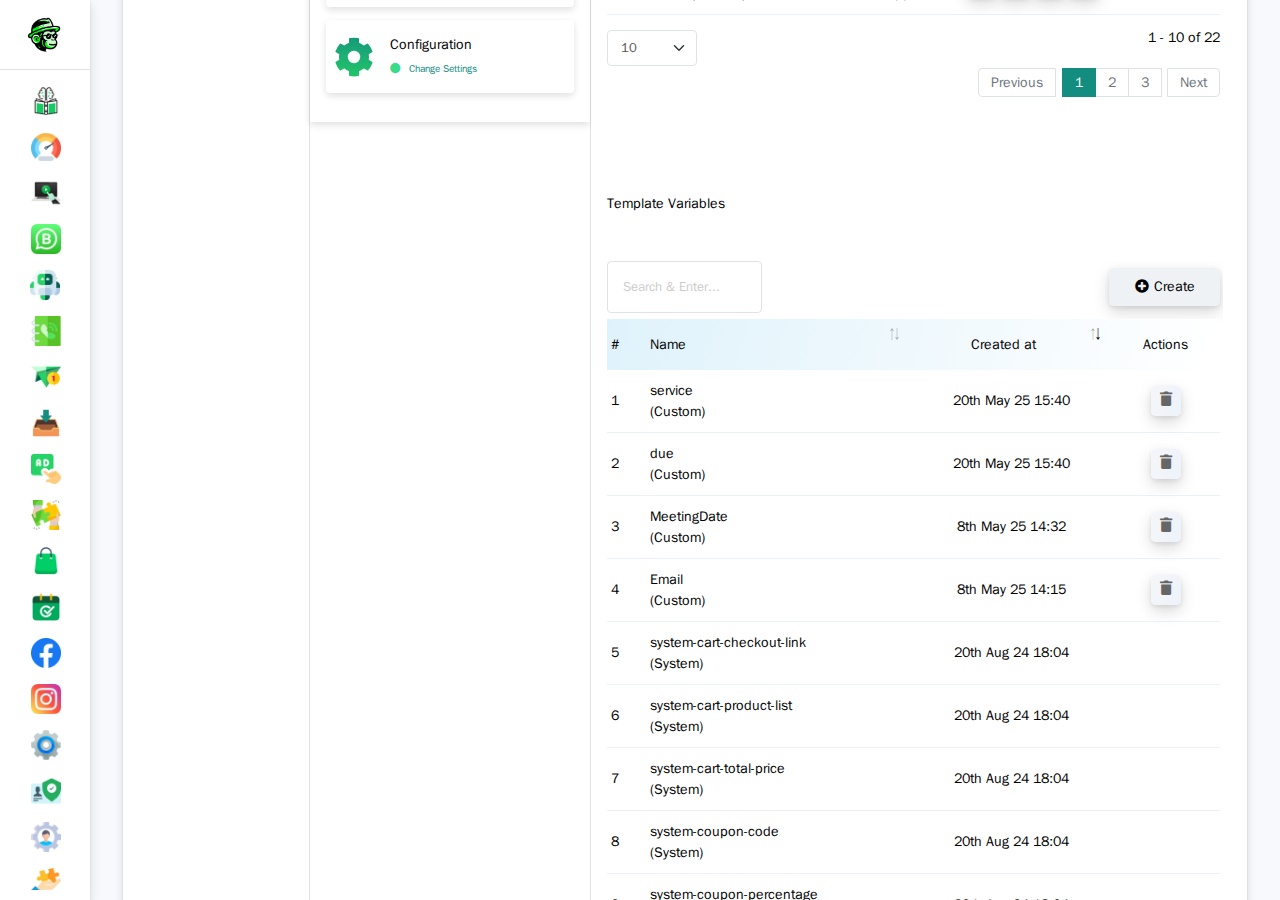
Vídeo: Tutorial de Variáveis de modelo
Video: https://www.youtube.com/watch?v=R5jz8SkAM9I
Como funcionam as Variáveis de modelo nos modelos
No corpo do seu modelo do WhatsApp (o que você envia para a Meta), você usa {{1}}, {{2}}, {{3}} como marcadores:
Your OTP code is {{1}}. It will expire in {{2}} minutes.When you send the message, you pass the actual values.
How Template Variables Work in the API
When sending a template message via API that uses Template Variables, you MUST include the variable values in your API call:
https://app.whatchimp.com/api/v1/whatsapp/send?apiToken=API-KEY&phone_number_id=PHONE-NUMBER-ID&phone_number=919999999999&template_name=otp_verification&language_code=en_US&variable1=123456&variable2=5The API Console automatically generates these variable1=, variable2= placeholders for you when you select your template in the generator.
Custom Variables (Custom Fields)
Custom Variables — also called Custom Fields — are permanent data points stored on each subscriber's profile. Once you set them, they stay there until you update or delete them.
When to Use Custom Variables
Use Custom Variables for information that is:
- Persistent (doesn't change often)
- Applicable to the contact, not the message
- Reusable across multiple messages
Examples:
- Full name
- Company name
- Email address
- Country or city
- Industry or job title
- Customer tier (Gold, Silver, Bronze)
- Account manager name
Where to Create Custom Variables
Step A. Go to Subscriber Manager > Manage Custom Fields.
Or navigate directly to: /whatsapp/subscriber/manager/custom-field/list
Step B. Click Create and define your field name (e.g., company_name, country, email).
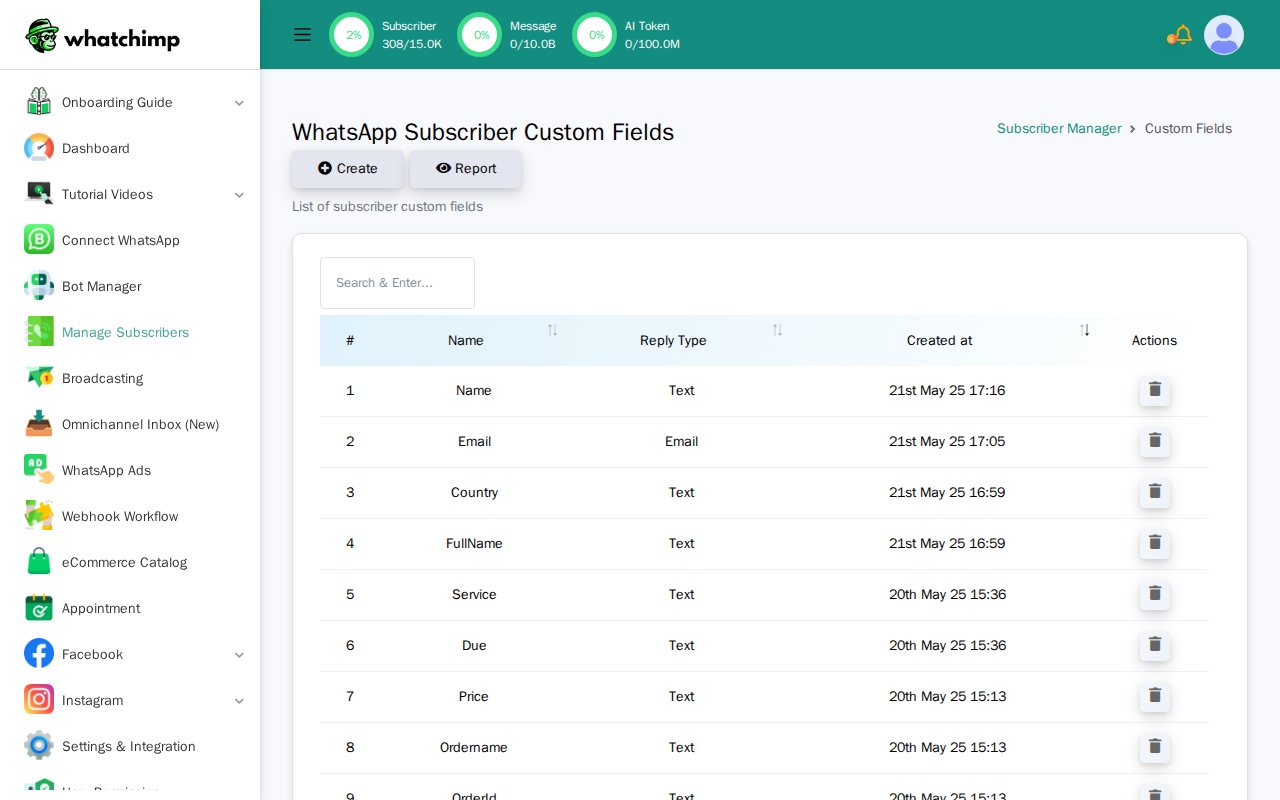
Step C. Set these fields on your subscribers using:
- The Subscriber Manager UI (manual entry)
- CSV import
- The WhatChimp Subscriber API
Video: Custom Variables Walkthrough
Video: https://www.youtube.com/watch?v=yd1O0Sd_zDQ
How Custom Variables Work in Templates
When creating your template in WhatChimp, you insert Custom Fields using the "Custom Fields" dropdown (NOT the "Variables" dropdown).
In your WhatsApp template body, they appear as:
Hi {{first_name}}, your company {{company_name}} has been verified!How Custom Variables Work in the API
This is the critical difference: When you send a template via API that uses Custom Variables, you do NOT pass the variable values in the API call.
https://app.whatchimp.com/api/v1/whatsapp/send?apiToken=API-KEY&phone_number_id=PHONE-NUMBER-ID&phone_number=919999999999&template_name=special_offer&language_code=en_USNotice: No variable1= parameters. The system automatically pulls the custom field values from the subscriber's stored data.
Important: You must set these custom field values on the subscriber BEFORE sending the message. If the subscriber doesn't have a value for company_name, that part of the message will be blank or show an error.
Which Should You Use?
Ask yourself: "Will this data change every time I send a message to this person?"
- Yes → Use Template Variables (e.g., OTP codes, order numbers)
- No → Use Custom Variables (e.g., name, company, email)
Can You Use Both?
Yes! You can combine both in the same template:
Hi {{first_name}}, your order {{1}} will arrive on {{2}}.{{first_name}}is a Custom Variable (pulled from subscriber data){{1}}and{{2}}are Template Variables (you passvariable1=ORD-123andvariable2=Feb 10in the API)
How This Affects the API
This is where most developers get confused. The API behavior is completely different for each type.
Template Variables in API Calls
You MUST pass values using variable1=, variable2=, etc.
curl "https://app.whatchimp.com/api/v1/whatsapp/send?apiToken=API-KEY&phone_number_id=PHONE-NUMBER-ID&phone_number=919999999999&template_name=order_update&language_code=en_US&variable1=ABC123&variable2=Feb%2015"If you forget to include the variable parameters, your message will fail or show blank placeholders.
Custom Variables in API Calls
You do NOT pass values. The system pulls them from the subscriber's profile.
curl "https://app.whatchimp.com/api/v1/whatsapp/send?apiToken=API-KEY&phone_number_id=PHONE-NUMBER-ID&phone_number=919999999999&template_name=special_offer&language_code=en_US"Before sending, you must set the custom fields on the subscriber using the WhatChimp Subscriber API:
curl -X POST "https://app.whatchimp.com/api/v1/whatsapp/subscriber/update" \
  -d "apiToken=API-KEY" \
  -d "phone_number_id=PHONE-NUMBER-ID" \
  -d "phone_number=919999999999" \
  -d "custom_fields[company]=Acme Corp" \
  -d "custom_fields[country]=United States"
See the WhatChimp Subscriber Management API for the full reference on assigning custom fields.
Common mistake: Developers try to pass custom field values as variable1=, variable2= na API de mensagem de modelo. Isso não funciona. Os campos personalizados são extraídos dos dados do assinante, não dos parâmetros da chamada da API.
Tutoriais em vídeo
Assista a esses tutoriais em vídeo passo a passo de Anant (fundador do WhatChimp):
Variáveis de modelo
Video: https://www.youtube.com/watch?v=R5jz8SkAM9I
Variáveis personalizadas (Campos personalizados)
Video: https://www.youtube.com/watch?v=yd1O0Sd_zDQ