Webhook on Keyword Trigger
Fire a webhook every time a customer triggers a specific keyword in your chatbot
Updated 10 February 2026
When creating a keyword-based chatbot in WhatChimp, you can fire a webhook every time that keyword is triggered. This sends the subscriber's data to your external system automatically — no extra steps needed.
How to Set It Up
Go to Bot Manager → Bot Reply → Create (or edit an existing chatbot). When configuring the keyword trigger, scroll down to find the Send data to Webhook URL field.
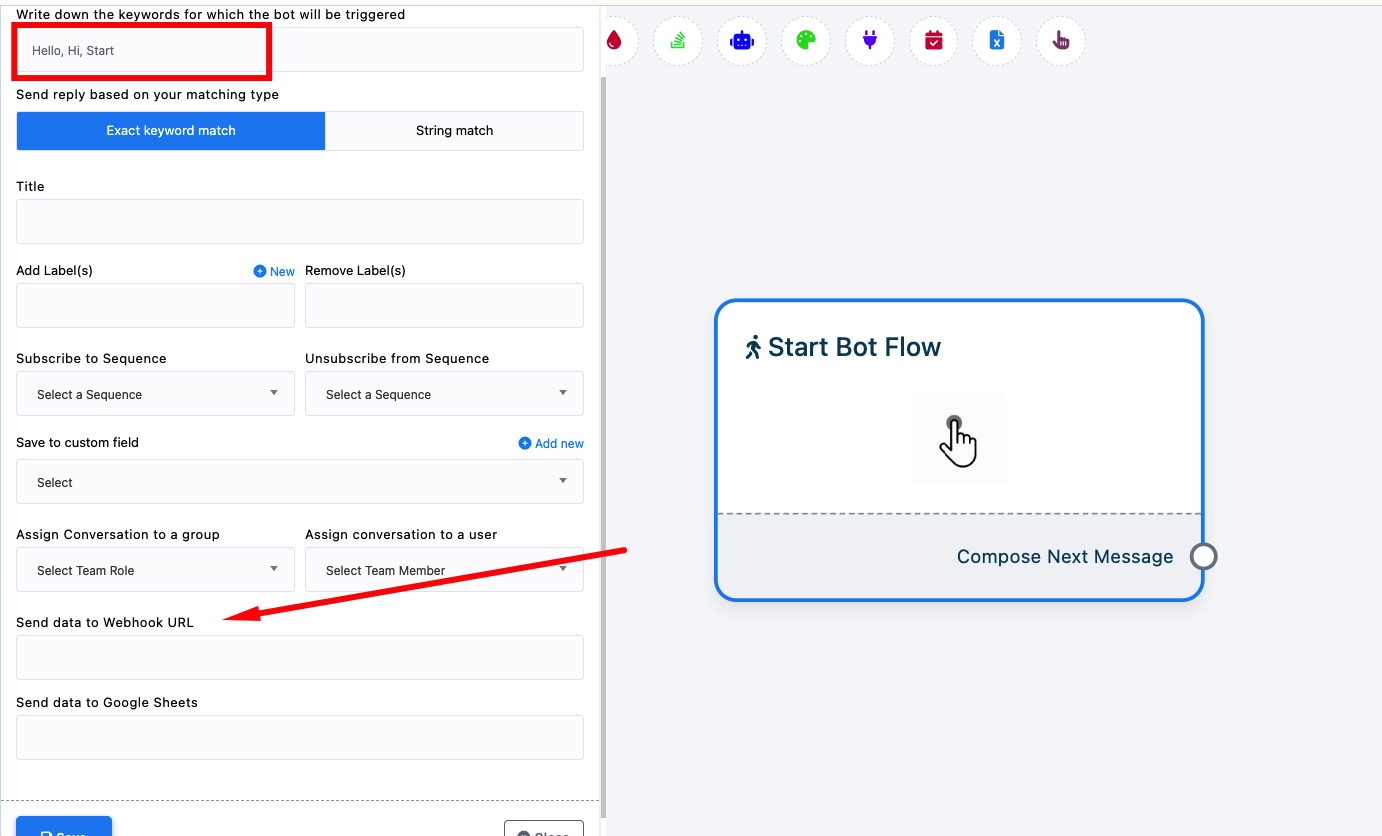
Write down the keywords that trigger this bot (e.g., "Hello, Hi, Start").
Send data to Webhook URL — Paste your webhook endpoint URL here. Every time a customer sends one of these keywords, WhatChimp will POST the subscriber's data to this URL.
The webhook fires at the moment the keyword is matched, before the bot reply is sent. This means your external system gets notified instantly.
Tip: You can also use Send data to Google Sheets right below to log keyword triggers to a spreadsheet.
Related Articles
How to Create a Keyword-Based WhatsApp Chatbot — Full guide on setting up keyword triggers
Webhook for Incoming and Outgoing Messages — Fire webhooks for all messages, not just keywords