Template Variables vs Custom Variables - Kya faraq hai?
Updated 10 February 2026
Yeh WhatChimp users ke liye sabse zyada common confusion ka source hai: aapko Template Variables kab use karne chahiye aur Custom Variables (Custom Fields) kab? Dono WhatsApp messages ko personalize karne dete hain, lekin ye fundamentally alag tarike se kaam karte hain.
Is faraq ko samajhna bahut zaroori hai, khaas taur par agar aap WhatChimp API use kar rahe hain. Galat type use karne se aapke messages fail ho sakte hain ya galat data display ho sakta hai.
Quick comparison
| Feature | Template Variables | Custom Variables (Custom Fields) |
|---|---|---|
| Kahan banaye jate hain | Bot Manager > Message Template > Template Variables section | Subscriber Manager > Manage Custom Fields |
| Data storage | Temporary — har baar bhejte waqt pass karna hota hai | Permanent — subscriber profile par store hota hai |
| Kis se attached hota hai | Message se (contact se nahi) | Contact/subscriber se |
| Best for | Dynamic data jo har baar badalta hai: OTPs, order numbers, delivery dates, meeting links | Persistent data jo kabhi-kabhi badalta hai: name, company, email, country, industry |
| Template syntax | {{1}}, {{2}}, {{3}} | {{custom_field_name}} |
| API behavior | Aapko API call mein values pass karni HOGI (variable1=VALUE) | System automatically subscriber data se pull karta hai — API call mein pass karne ki zarurat NAHI |
| Example use cases | One-time password: 123456<br>Order ID: ORD-9842<br>Delivery date: Feb 15 | Customer name: John Smith<br>Company: Acme Corp<br>Country: United States |
Template Variables
Template Variables temporary placeholders hote hain jo har message ke saath change hote hain. Ye kahin store NAHI hote — aap har baar value provide karte hain.
Template Variables kab use karein
Template Variables use karein un informations ke liye jo:
- Har message ke liye unique hoti hain (har baar change hoti hain)
- Time-sensitive ya one-time use hoti hain
- Permanently store karne layak nahi hain
Examples:
- OTP codes (minutes mein expire ho jate hain)
- Order confirmation numbers
- Appointment times ya meeting links
- Tracking numbers
- Invoice amounts
- Password reset tokens
Template Variables kahan banaye
Step A. Bot Manager > Message Template mein jaayein aur apna bot select karein.
Step B. "Template Variables" section tak scroll karein (aapke template body ke neeche).
Step C. Apne variables yahan define karein (jaise, variable1, variable2).
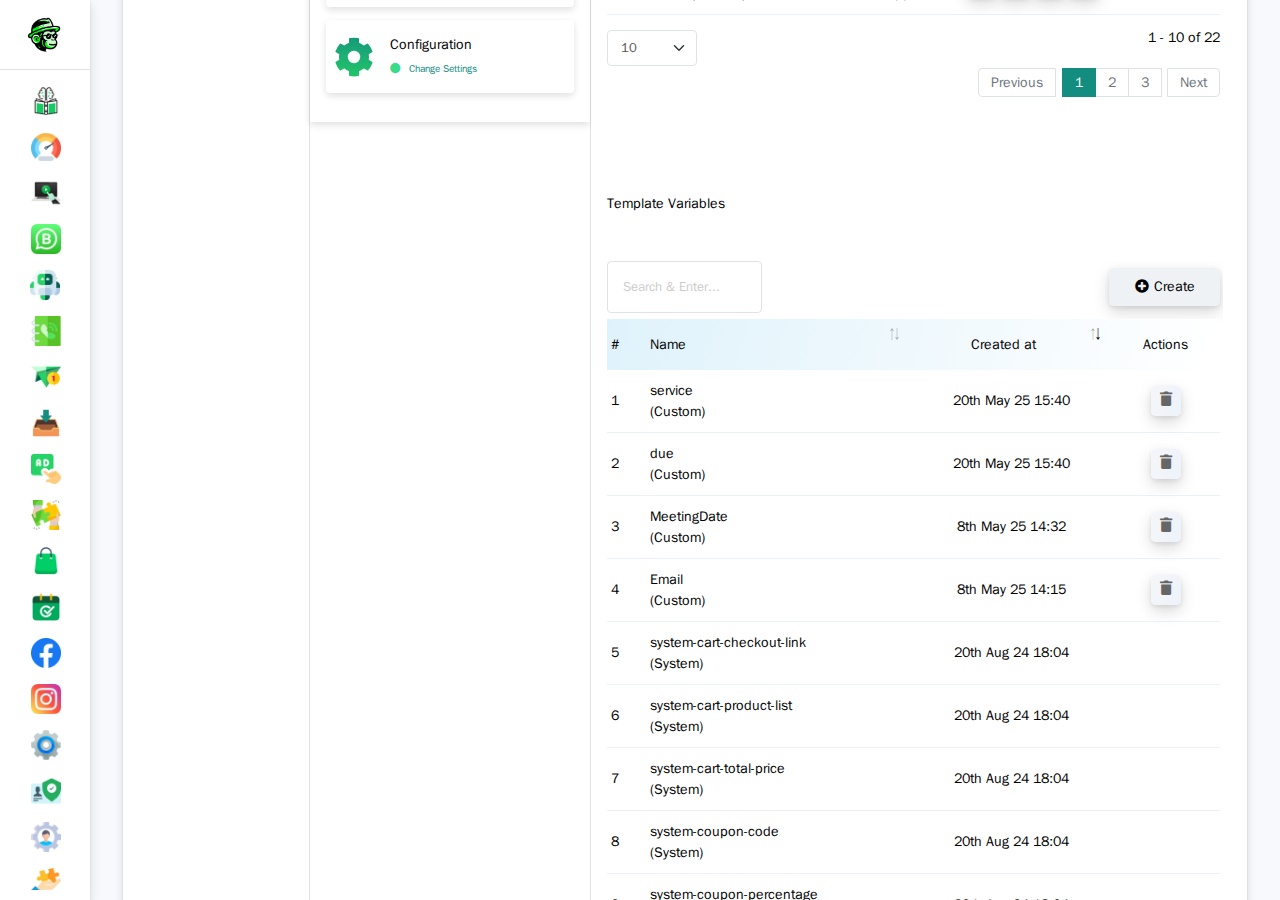
Video: Template Variables walkthrough
Video: https://www.youtube.com/watch?v=R5jz8SkAM9I
Templates mein Template Variables kaise kaam karte hain
Apne WhatsApp template body mein (jo aap Meta ko submit karte hain), aap {{1}}, {{2}}, {{3}} ko placeholders ke roop mein use karte hain:
Aapka OTP code {{1}} hai. Yeh {{2}} minutes mein expire ho jayega.Jab aap message bhejte hain, to aap actual values pass karte hain.
API mein Template Variables kaise kaam karte hain
Jab aap API ke zariye ek template message bhejte hain jo Template Variables use karta hai, to aapko API call mein variable values include karni HOGI:
https://app.whatchimp.com/api/v1/whatsapp/send?apiToken=API-KEY&phone_number_id=PHONE-NUMBER-ID&phone_number=919999999999&template_name=otp_verification&language_code=en_US&variable1=123456&variable2=5API Console automatically in variable1=, variable2= placeholders ko aapke liye generate karta hai jab aap generator mein apna template select karte hain.
Custom Variables (Custom Fields)
Custom Variables — jinhe Custom Fields bhi kaha jata hai — permanent data points hote hain jo har subscriber ki profile par store hote hain. Ek baar aap inhe set kar dete hain, to ye tab tak wahan rehte hain jab tak aap inhe update ya delete nahi karte.
Custom Variables kab use karein
Custom Variables use karein un informations ke liye jo:
- Persistent hoti hain (aksar change nahi hoti)
- Contact par applicable hoti hain, message par nahi
- Multiple messages ke liye reusable hoti hain
Examples:
- Full name
- Company name
- Email address
- Country ya city
- Industry ya job title
- Customer tier (Gold, Silver, Bronze)
- Account manager name
Custom Variables kahan banaye
Step A. Subscriber Manager > Manage Custom Fields mein jaayein.
Ya seedha yahan navigate karein: /whatsapp/subscriber/manager/custom-field/list
Step B. Create par click karein aur apne field ka naam define karein (jaise, company_name, country, email).
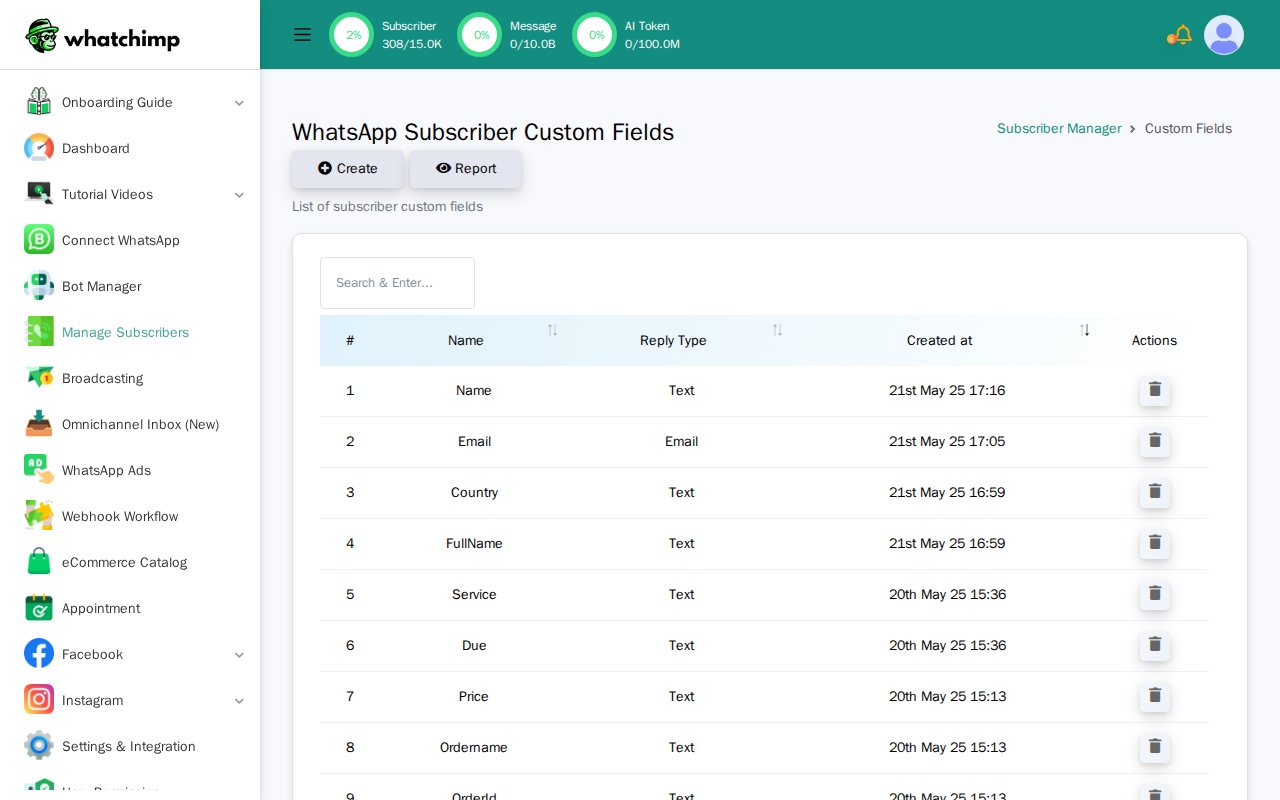
Step C. Apne subscribers par ye fields set karein using:
- Subscriber Manager UI (manual entry)
- CSV import
- WhatChimp Subscriber API
Video: Custom Variables walkthrough
Video: https://www.youtube.com/watch?v=yd1O0Sd_zDQ
Templates mein Custom Variables kaise kaam karte hain
Jab aap WhatChimp mein apna template banate hain, to aap Custom Fields ko "Custom Fields" dropdown use karke insert karte hain ("Variables" dropdown NAHI).
Apne WhatsApp template body mein, ye aise appear hote hain:
Hi {{first_name}}, aapki company {{company_name}} verify ho gayi hai!API mein Custom Variables kaise kaam karte hain
Yeh critical difference hai: Jab aap API ke zariye ek template bhejte hain jo Custom Variables use karta hai, to aap API call mein variable values pass NAHI karte.
https://app.whatchimp.com/api/v1/whatsapp/send?apiToken=API-KEY&phone_number_id=PHONE-NUMBER-ID&phone_number=919999999999&template_name=special_offer&language_code=en_USDhyan dein: Koi variable1= parameters nahi hain. System automatically subscriber ke stored data se custom field values pull karta hai.
Important: Aapko message bhejne se PEHLE subscriber par ye custom field values set karni hongi. Agar subscriber ke paas company_name ki value nahi hai, to message ka woh part blank hoga ya error dikhayega.
Aapko kaunsa use karna chahiye?
Apne aap se poochein: "Kya yeh data har baar change hoga jab main is person ko message bhejunga?"
- Haan → Template Variables use karein (jaise, OTP codes, order numbers)
- Nahi → Custom Variables use karein (jaise, name, company, email)
Kya aap dono use kar sakte hain?
Haan! Aap ek hi template mein dono ko combine kar sakte hain:
Hi {{first_name}}, aapka order {{1}} ko {{2}} par aayega.{{first_name}}ek Custom Variable hai (subscriber data se pull hota hai){{1}}aur{{2}}Template Variables hain (aap API meinvariable1=ORD-123aurvariable2=Feb 10pass karte hain)
Yeh API ko kaise affect karta hai
Yahan par zyada tar developers confused ho jate hain. API behavior har type ke liye bilkul alag hai.
API calls mein Template Variables
Aapko values pass karni HOGI variable1=, variable2=, etc. use karke.
curl "https://app.whatchimp.com/api/v1/whatsapp/send?apiToken=API-KEY&phone_number_id=PHONE-NUMBER-ID&phone_number=919999999999&template_name=order_update&language_code=en_US&variable1=ABC123&variable2=Feb%2015"Agar aap variable parameters include karna bhool jate hain, to aapka message fail hoga ya blank placeholders dikhayega.
API calls mein Custom Variables
Aap values pass NAHI karte. System subscriber ki profile se pull karta hai.
curl "https://app.whatchimp.com/api/v1/whatsapp/send?apiToken=API-KEY&phone_number_id=PHONE-NUMBER-ID&phone_number=919999999999&template_name=special_offer&language_code=en_US"Bhejne se pehle, aapko WhatChimp Subscriber API use karke subscriber par custom fields set karni hogi:
curl -X POST "https://app.whatchimp.com/api/v1/whatsapp/subscriber/update" \
  -d "apiToken=API-KEY" \
  -d "phone_number_id=PHONE-NUMBER-ID" \
  -d "phone_number=919999999999" \
  -d "custom_fields[company]=Acme Corp" \
  -d "custom_fields[country]=United States"
Custom fields assign karne ke full reference ke liye WhatChimp Subscriber Management API dekhein.
Common mistake: Developers template message API mein custom field values ko variable1=, variable2= ke roop mein pass karne ki koshish karte hain. Yeh kaam nahi karta. Custom fields subscriber data se pull hote hain, API call parameters se nahi.
Video walkthroughs
Anant (WhatChimp founder) ki ye step-by-step video tutorials dekhein:
Template Variables
Video: https://www.youtube.com/watch?v=R5jz8SkAM9I
Custom Variables (Custom Fields)
Video: https://www.youtube.com/watch?v=yd1O0Sd_zDQ