Button Click par Webhook
Jab koi customer aapke chatbot flow mein kisi specific button par click kare tab webhook fire karein
Updated 10 February 2026
Aap webhook fire kar sakte hain jab koi customer aapke chatbot mein kisi specific button par click karta hai. Yeh aapko button interactions track karne, external systems mein actions trigger karne, ya data sync karne deta hai jis moment user koi choice banata hai.
Kaise Setup Karein
Apne bot flow mein, kisi bhi Button component par click karke uski settings kholein. Send data to Webhook URL field dhoondhne ke liye neeche scroll karein.
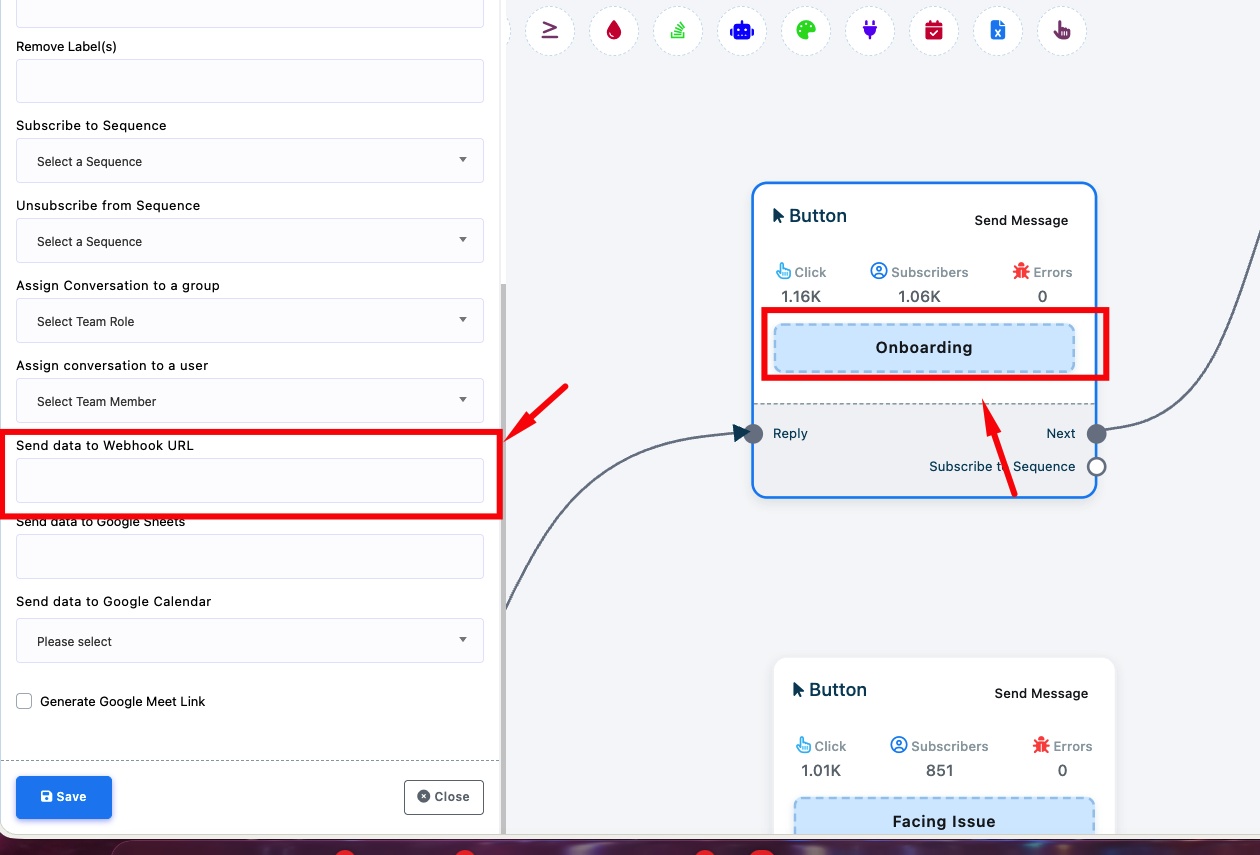
Send data to Webhook URL — Apne webhook endpoint URL ko paste karein. Har baar jab koi customer is button par click karega, WhatChimp subscriber ka data aapke URL par POST karega.
Aapki flow mein har button ka apna webhook URL ho sakta hai, isliye aap customer kis button par click karta hai uske basis par alag-alag actions trigger kar sakte hain. For example:
- "Onboarding" button → aapke onboarding system par webhook fire karta hai
- "Facing Issue" button → aapke support ticketing system par webhook fire karta hai
Tip: Aap same button settings se Google Sheets ya Google Calendar mein bhi data bhej sakte hain.
Related Articles
Clickable CTA Buttons Kaise Add Karein — Apne chatbot mein buttons add karne ki full guide
Keyword Trigger par Webhook — Jab specific keywords match ho tab webhooks fire karein