Input Flow ke liye Webhook
Input Flow se collect kiye gaye chat responses ko automatically apne webhook URL par bhejein
Updated 10 February 2026
Input Flow aapke chatbot ko chat ke through step-by-step sawaal poochne aur customers se jawab collect karne deta hai. Aap saare collected answers ko webhook URL par automatically bhej sakte hain jab flow complete ho jaaye.
Kaise Setup Karein
Bot Manager → Input Flow par jaayen aur ek Input Flow campaign create ya edit karein. Campaign settings mein, Send data to Webhook URL field dhoondhein.
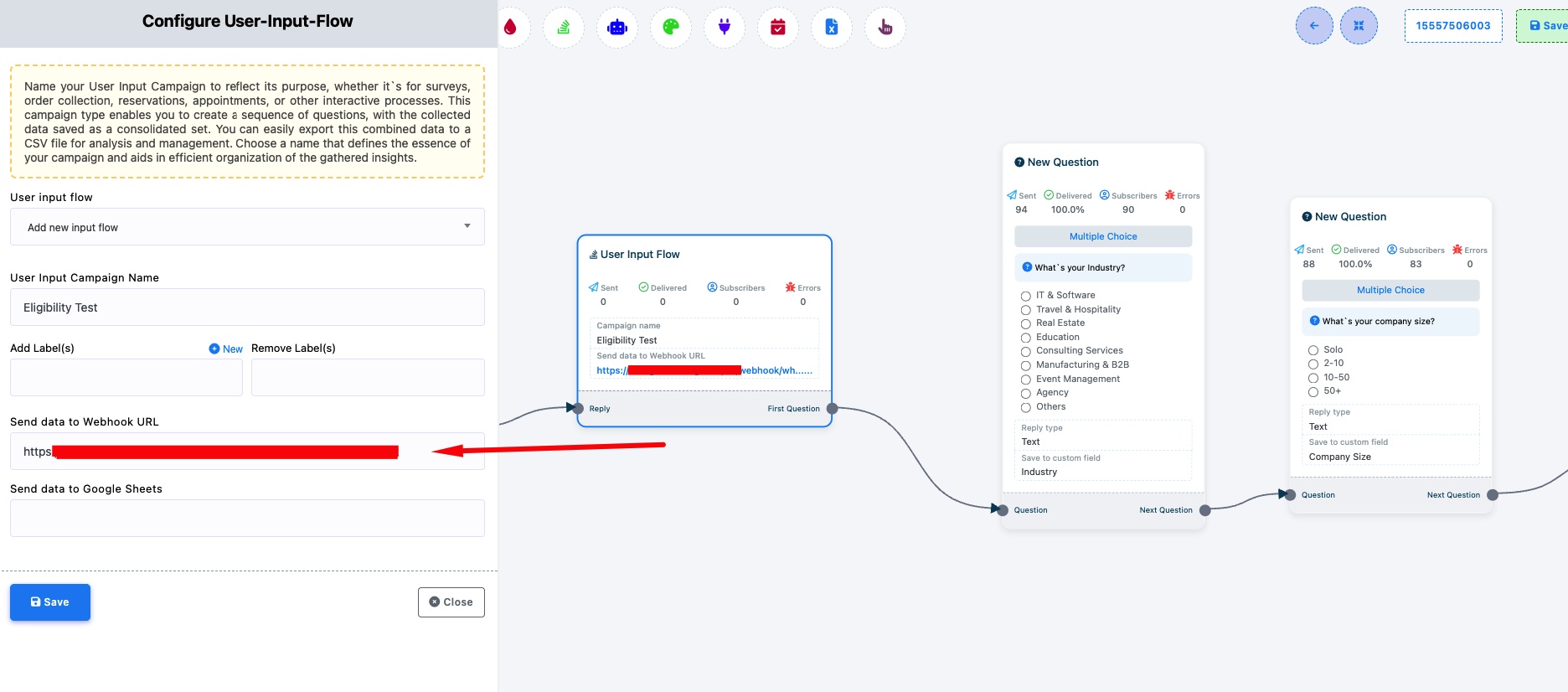
Send data to Webhook URL — Apne webhook endpoint URL ko paste karein. Jab koi customer Input Flow complete karta hai (saare questions ka jawab deta hai), WhatChimp saara collected data is URL par HTTP POST ke through bhejta hai.
Yeh useful hai jab aap:
- Lead information collect karna chahte hain (naam, email, requirements) aur use apne CRM mein push karna chahte hain
- Survey responses gather karna chahte hain aur unhe apne analytics platform par bhejana chahte hain
- Support details collect karna chahte hain aur apne helpdesk mein ticket create karna chahte hain
Tip: Input Flow campaigns setup karne ki detailed guide ke liye User Input Flow ke saath Complex Conversations ko Automate Kaise Karein dekhein.
Related Articles
User Input Flow ke saath Complex Conversations ko Automate Kaise Karein — Input Flow campaigns create karne ki full guide
Button Click par Webhook — Jab customers chatbot buttons par click karein tab webhooks fire karein